What Is a Brat Generator? A Complete Guide
Have you seen images with bright lime-green backgrounds and simple black text? This recognizable look is associated with Charli XCX’s Brat album and has become a popular visual style on social media. A Brat Generator is an online tool that lets you create similar text-based graphics using your own words.
You can use a Brat Generator to make social media posts, memes, profile pictures, and personal messages. Instead of designing an image from scratch, you can enter your text, preview the result, and customize it using the features available in the tool.
What Is a Brat Generator?
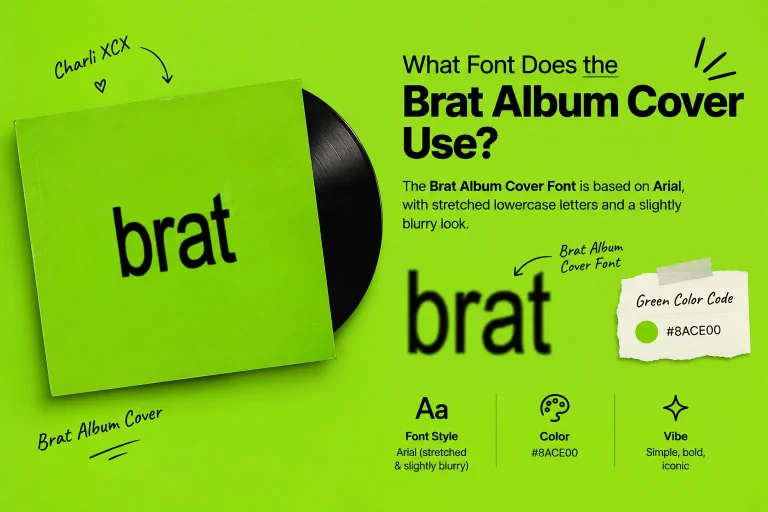
A Brat Generator is an image-making tool inspired by the visual style of Charli XCX’s Brat album. The original album cover is known for its bright lime-green background and simple lowercase lettering.
With a Brat Generator, you can enter your own text and turn it into a graphic with a similar minimalist appearance. Depending on the tool, you may also be able to adjust colors, preview your design, and download the finished image.
Most online generators work directly in your web browser, so you can create text-based graphics without professional design software.
Brat Aesthetic vs. Original Brat Album Cover
The original Brat album cover uses a lime-green background and lowercase text. The Brat aesthetic takes inspiration from this look but allows different colors, words, and creative designs.
| Feature | Original Brat Album Cover | Brat Aesthetic |
|---|---|---|
| Background | Lime-green background | Different background colors |
| Typography | Lowercase album text | Different words and phrases |
| Layout | Simple and minimal | Creative layout variations |
| Text Style | Distinctive blurred lettering | Different text styles |
| Artwork | Official Charli XCX album cover | Fan-inspired creative designs |
How Does a Brat Generator Work?
Creating a Brat-style image is simple. Although the available features vary between tools, the usual process involves these steps:
Enter your text
Type your name, a short phrase, a caption, or a message into the text box.
Customize the design
Choose from the available colors, text styles, or other settings.
Preview your image
Check how your text looks against the background.
Adjust your design
Edit the wording or settings until you are happy with the result.
Save your image
Download the finished graphic if the tool provides a download option.
Once your image is ready, you can use it for personal projects or share it on platforms that support the image format.
What Can You Create With a Brat Generator?
A Brat Generator can help you create different types of text-based graphics for everyday use.
Social Media Posts
Create simple graphics for Instagram stories, posts, and other social platforms. Short phrases and bold colors can help your message stand out.
Memes and Funny Messages
Turn jokes, reactions, or inside jokes into shareable images. The simple layout keeps the focus on your words.
Profile Pictures
Use your name, initials, or a favorite phrase to create a personalized profile image. Check the image requirements of your chosen platform before uploading it.
Captions and Personal Messages
Turn short captions, quotes, or messages into graphics to share with friends. This style works especially well when you want the text to be the main focus.
Fan-Inspired Designs
Create personal graphics inspired by the Brat aesthetic. Keep in mind that fan-made designs should not be presented as official artwork or products.
How to Choose Text for a Brat-Style Design
The words you choose can change the overall look of your Brat-style graphic. A few simple choices can make your design clearer and more visually balanced.
- Keep text short: Short words and phrases work well with minimalist layouts.
- Choose meaningful words: Use a name, caption, or phrase that matches your idea.
- Consider readability: Make sure the text is easy to understand against the background.
- Avoid unnecessary words: Too much text can make a simple design look crowded.
A clear message and simple layout help maintain the recognizable Brat-inspired style.
Why Is the Brat Generator Popular?
The Brat aesthetic became popular through Charli XCX’s Brat album, known for its lime-green background and simple lowercase text. A Brat Generator lets anyone recreate a similar look without design skills.
Why Is the Brat Album Cover Design So Recognizable?
The Brat album cover stands out because of its simple but distinctive visual design.
- Lime-green background: The bright color makes the cover easy to recognize.
- Lowercase lettering: The album title uses simple lowercase text.
- Minimal layout: The design avoids unnecessary images and decorations.
- Blurred typography: The slightly blurred lettering gives the original cover its distinctive appearance.
Together, these elements created a visual identity that fans and creators began using in their own designs.
Is a Brat Generator Free to Use?
Many Brat Generators are free, but features may vary. Some offer free downloads, while others may include watermarks, limits, or paid options.
Can You Use a Brat Generator on Your Phone?
Yes. Most browser-based generators work on smartphones, tablets, and computers. Enter your text, customize the available settings, and save your image if downloads are supported.
Is a Brat Generator an Official Charli XCX Tool?
Not necessarily. Most generators are independent tools inspired by the Brat aesthetic and are not automatically affiliated with Charli XCX. Check usage rights before selling or commercially publishing your designs.
Frequently Asked Questions (FAQs)
Create Your Own Brat-Style Graphic
A Brat Generator offers a simple way to create text-based graphics inspired by the recognizable Brat aesthetic. Whether you want a social media post, a meme, or a personalized image, you can experiment with your own text and find a style that suits your idea.
Ready to make your own design? Try our Brat Generator to enter your text, preview your graphic, and save your image using the available features.