Album Cover Generator
In 2026, music is more visual than ever. If it is a Spotify playlist, a SoundCloud drop, or a YouTube beat release, one thing is always important your album cover. It is the first thing people see, and it creates the first impression. If you are not a designer, making a good cover can feel difficult and stressful.
That is where an album cover generator comes in. These tools make it incredibly easy for anyone, from independent artists to content creators, to design high-quality, eye-catching album covers without any graphic design skills.
In this article, we will explore what album cover generators are, how they work, why they are essential for musicians and marketers in 2026, and how you can use them effectively.
What is an album cover generator?
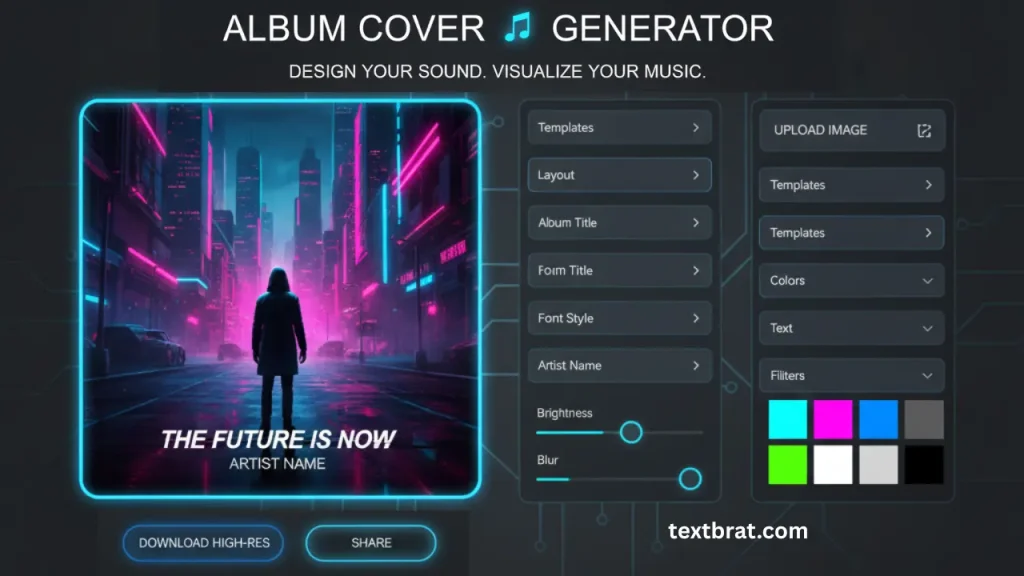
An Album Cover Generator is a free online tool that lets musicians, artists, and content creators design professional-quality album artwork without graphic design skills or expensive software. Simply upload your image or choose from pre-made templates, add your album title and artist name, customize fonts and colors, and download your custom cover art instantly in high resolution.
Whether you are an independent musician releasing your first single on Spotify, a podcast creator needing eye-catching cover art, or a music enthusiast making custom playlist covers, this tool gives you everything you need to create stunning album artwork in minutes, completely free with no watermarks or hidden charges.
How to Create Your Album Cover in 5 Simple Steps
Creating professional album art has never been easier. Follow these simple steps:
Step 1: Choose Your Background
Upload your own image or select from our curated library of high-quality backgrounds. You can use photos, abstract designs, solid colors, or gradient backgrounds. Supported formats include JPG, PNG, and WebP, up to 10 MB.
Step 2: Add Your Album Title
Enter your album or song title in the text field. Our generator automatically centers and sizes the text for optimal readability.
Step 3: Add Artist Name
Include your artist name, band name, or stage name. You can position this above or below the album title.
Step 4: Customize the Design
Pick from more than 100 font styles, including popular designs like simple Brat-style, Y2K looks, retro text, and modern clean fonts. You can change the text size, color, transparency, and position. You can also add filters and effects to your background image, like blur, brightness, contrast, and vintage styles.
Step 5: Download Your Cover Art
Preview your design and download it in your preferred resolution. We offer multiple export options, including 3000x3000px (Spotify/Apple Music standard), 1080x1080px (Instagram), 1920x1080px (YouTube thumbnails), and custom sizes.
Powerful Features for Professional Album Art
Multiple Aspect Ratios
Create covers in square (1:1), portrait (4:5), and landscape (16:9) formats to fit any platform requirement.
100+ Professional Fonts
Access our extensive font library, including
- Brat-style minimalist fonts (trending 2026)
- Y2K and 2000s revival typography
- Vintage and retro lettering
- Modern sans-serif fonts
- Script and handwritten styles
- Bold display fonts for hip-hop and rap
- Clean fonts for indie and alternative music
Advanced Customization Tools
- Text color picker with unlimited color options
- Background color and gradient editor
- Opacity and transparency controls
- Text shadow and outline effects
- Image filters (grayscale, sepia, vintage, vibrant)
- Blur and focus effects
- Brightness and contrast adjustments
Instant Preview
See your changes in real time as you design. What you see is exactly what you will get.
High-Resolution Downloads
Export your album covers in professional quality up to 3000×3000 pixels, perfect for all streaming platforms and physical media.
No Watermarks
Unlike many free tools, we never add watermarks to your downloads. Your art is 100% yours.
Zero Learning Curve
If you can type and click, you can create professional album art. No tutorials needed, no complicated menus.
Works on All Devices
Fully responsive design works seamlessly on desktop computers, tablets, and smartphones.
Save and Edit Later
Create an account (optional) to save your designs and return to edit them anytime.
Trending Album Cover Styles in 2026
Brat Style (Most Popular)
Inspired by Charli XCX’s famous album. It uses bold, small letters on bright, single-color backgrounds. The lime green color became very popular. Great for pop, hyperpop, and electronic music.
Minimalist & Clean
Simple design with clean fonts and lots of space. Focus on one strong image or idea. Good for indie, alternative, and singer-songwriter music.
Y2K Style
A fun early 2000s look with shiny chrome effects, cute fonts, and bright colors. Very trendy for pop, hip-hop, and electronic music.
Vintage & Retro
Old-school designs inspired by the 60s, 70s, and 80s. Uses warm colors, soft grain effects, and classic fonts. Perfect for rock, soul, funk, and jazz.
Abstract & Artistic
Uses bold colors, shapes, and creative art styles. Great for experimental, electronic, and indie music.
Photo Style
Uses a high-quality photo as the main focus with light text on top. Popular for R&B, hip-hop, country, and pop music.
Bold & Busy (Maximalist)
Full of layers, textures, and many elements. Very eye-catching and memorable. Often used by hip-hop, trap, and rap artists.
Dark & Moody
Dark backgrounds with strong lighting and bold text. Perfect for alternative, rock, metal, and emo music.
Who Uses Album Cover Generators?
Professional Quality Standards for All Platforms
To make sure your album cover looks clear and professional on every platform, use the right size and format. Here are the recommended settings:
Spotify
- Minimum size: 640 × 640 pixels
- Best quality: 3000 × 3000 pixels
- Format: JPG or PNG
- Color mode: RGB
- File size: Under 10MB
Apple Music & iTunes
- Minimum size: 1400 × 1400 pixels
- Recommended: 3000 × 3000 pixels (looks better on Apple devices)
- Format: JPG or PNG
- DPI: 72 minimum, 300 for print
- Color mode: RGB
SoundCloud
- Minimum size: 800 × 800 pixels
- Maximum size: 5000 × 5000 pixels
- Format: JPG or PNG
- Shape: Square (1:1 ratio)
YouTube Thumbnails
- Size: 1280 × 720 pixels
- Format: JPG or PNG
- File size: Under 2MB
- Square post: 1080 × 1080 pixels
- Portrait post: 1080 × 1350 pixels
- Story: 1080 × 1920 pixels
Bandcamp
- Recommended size: 1400 × 1400 pixels minimum
- Maximum: 3600 × 3600 pixels
- Format: JPG or PNG
Physical Media (CD & Vinyl)
- CD case: 1425 × 1425 pixels (300 DPI)
- Vinyl cover: 3600 × 3600 pixels (300 DPI)
- Digipak: Custom size
Our Generator Settings
- Export up to 3000 × 3000 pixels
- Formats: JPG, PNG, WebP
- RGB color mode for digital use
- Optional CMYK for printing (Pro feature)
- File size compression available
Where Creativity Meets Style: From Brat Text to Album Art
If you’re someone who enjoys adding flair to your content, like using a Brat Text Generator to create bold and stylish captions, then you’ll love what the Album Cover Generator can do for your music visuals. Both tools focus on aesthetic expression, allowing you to showcase your creativity across different platforms.
Start by styling your text with the Brat Generator, then move on to crafting a standout album cover, all from one creative space.
Album Cover Generator vs. Hiring a Graphic Designer
| Feature | Album Cover Generator | Freelance Graphic Designer |
|---|---|---|
| Cost | Free to $10 per design | $50–$300+ per design |
| Speed | 5–10 minutes | 2 to 7 days (avg.) |
| Creative Control | You control every element | The final design depends on the designer. |
| Skill Needed | None | N/A |
| Custom Illustration | Limited (template-based) | Fully custom and original |
| Brand Consistency | High, if using your own assets | Very high (professional polish) |
| Best for | Beginners, budget creators | Labels, pro artists, full branding |
Frequently Asked Questions (FAQs)
Conclusion
An album cover generator is more than just a tool; it’s your shortcut to standing out in the music world. Whether you’re creating bold designs, picking unique fonts, or shaping your album’s first impression, this tool gives you the power to express your vibe with style.
Try one today and let your visuals speak for you even before the music starts.