
Free Album Cover Generator
Create a custom album cover in seconds. Add your song title and artist name, choose a style, customize the design, and download your cover as a high-quality PNG.
Create Your Cover
Your changes appear in the preview instantly.
The image is read locally by your browser. Nothing is sent to a server.
Create custom album covers online with our free Album Cover Generator. Add your album title, artist name, images, colors, fonts, and visual effects to create artwork for Spotify, Apple Music, SoundCloud, YouTube, Instagram, and other platforms.
You can create a cover from scratch without advanced design skills or expensive design software. Choose your design elements, preview the result, and download your finished artwork.
If you want to explore more Brat-inspired tools and designs, visit our Brat Generator.
What Is an Album Cover Generator?
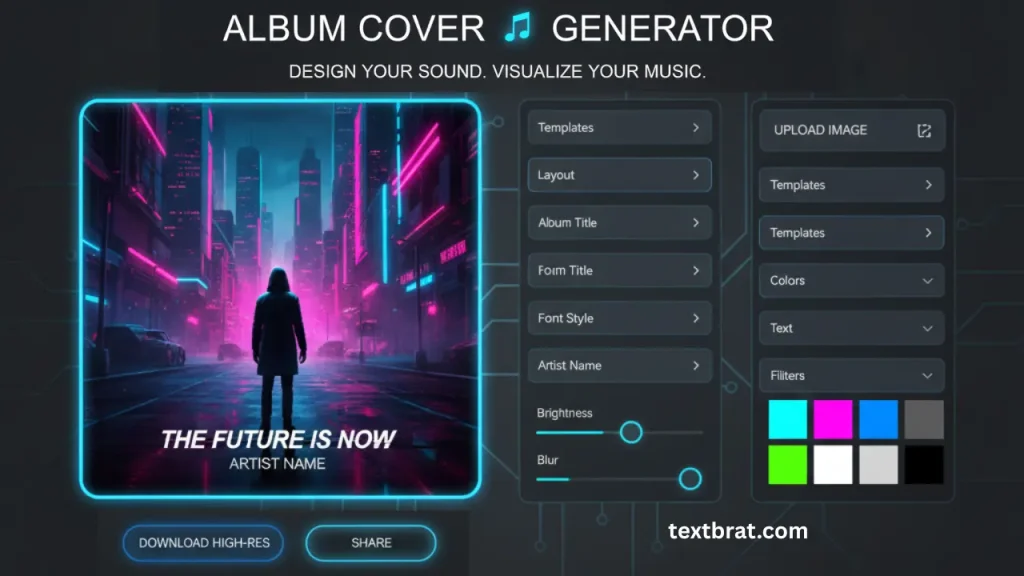
An Album Cover Generator is an online design tool that helps musicians, bands, DJs, producers, playlist curators, and content creators make custom album artwork.
Instead of starting with a blank design file, you can add your title, artist name, background, typography, colors, and other elements directly in the generator.
The tool can be useful for:
- Promotional music graphics
- Singles
- Albums
- EPs
- Spotify releases
- Playlist artwork
- SoundCloud releases
- YouTube music
- Social media posts
- Podcast artwork
Create Your Album Cover Online
Use the generator to build your artwork in a few simple steps.
Step 1: Choose Your Background
Upload your own image or select a suitable background color or design.
Depending on the available options, you can use:
- Photos
- Solid colors
- Gradients
- Abstract backgrounds
- Minimal backgrounds
- Textured backgrounds
For a clean album cover, choose a background that provides enough contrast for your title and artist name.
Step 2: Add Your Album or Song Title
Enter the name of your album, EP, or single.
Keep the main title easy to read and choose a font size that remains clear when the artwork is displayed as a small thumbnail.
Step 3: Add Your Artist Name
Add your artist, band, DJ, or producer name.
You can position the artist name above, below, or around the main title depending on the design you want to create.
Step 4: Customize the Typography
Typography has a major role in album artwork.
Depending on the available controls, you can adjust:
- Font style
- Font size
- Text color
- Text position
- Text alignment
- Transparency
- Letter spacing
- Text effects
If you want to create typography with a Brat-inspired look, try our Brat Font Generator before adding the text to your album cover.
Step 5: Adjust Colors and Effects
Use background colors and visual effects to establish the overall look of your cover.
You can experiment with:
- High-contrast colors
- Neutral colors
- Bright colors
- Dark backgrounds
- Gradients
- Blur effects
- Brightness
- Contrast
- Vintage effects
Step 6: Preview and Download
Check the final design before downloading it.
Make sure the title, artist name, images, and other elements are positioned correctly and remain readable.
Album Cover Generator Features
Custom Album Artwork
Create artwork for singles, albums, EPs, playlists, and music promotions.
Text-Based Album Designs
Build covers around typography when you want the title to become the main visual element.
Custom Colors
Experiment with different background and text colors to create different visual styles.
Multiple Design Styles
Create minimalist, retro, Y2K, photo-based, abstract, dark, colorful, or text-focused album artwork.
Image Support
Where supported by the generator, upload your own image and combine it with custom text and visual settings.
Multiple Export Sizes
Create artwork suitable for different platforms and social media placements.
Preview Before Download
Review the final design before saving the finished cover.
Mobile-Friendly Design
Create and edit album artwork from desktop, tablet, or mobile devices.
No Watermark
If the tool provides watermark-free exports, users can download their artwork without an added watermark.
No Design Experience Required
The generator is designed for users who want to create album artwork without learning complex design software.
Popular Album Cover Styles
Brat-Style Album Covers
Brat-style artwork is strongly associated with minimalist typography, simple backgrounds, bold text, and high visual contrast. If you want to experiment with Brat-inspired visuals or create an image to use as a starting point, try our Brat Image Generator.
A typical design can use a bright single-color background with small lowercase text positioned with plenty of empty space.
This style works particularly well for pop, electronic, hyperpop, and experimental music.
When creating this type of artwork, focus on:
- Simple backgrounds
- Strong color contrast
- Minimal visual elements
- Bold typography
- Short text
- Clear spacing
Minimalist Album Covers
Minimalist artwork uses fewer visual elements and places attention on one main idea.
Common characteristics include:
- Simple backgrounds
- Limited colors
- Clean typography
- Large areas of empty space
- One main image or text element
Y2K Album Covers
Y2K-inspired artwork often uses bright colors, chrome effects, playful typography, gradients, and early-2000s visual references.
Vintage & Retro Album Covers
Retro designs can use grain, muted colors, classic typography, faded imagery, and visual references from earlier music eras.
Abstract Album Covers
Abstract artwork uses shapes, colors, textures, patterns, and unusual compositions instead of relying on a conventional photograph.
Photo-Based Album Covers
Use a photograph as the main visual element and place the album title and artist name around it.
Dark & Moody Album Covers
Dark backgrounds, strong contrast, shadows, and limited color palettes can work well for rock, metal, alternative, emo, and darker electronic genres.
Recommended Album Cover Sizes
The correct dimensions depend on the platform where the artwork will be published.
Spotify
For high-quality square artwork, a large square image is generally preferred.
Recommended working size:
3000 × 3000 pixels
Format:
JPG or PNG
Apple Music
Use a high-resolution square cover and follow the current delivery requirements of your distributor or Apple Music.
SoundCloud
Square artwork is commonly used for music releases.
YouTube
For a standard YouTube thumbnail:
1280 × 720 pixels
Square post:
1080 × 1080 pixels
Portrait post:
1080 × 1350 pixels
Story:
1080 × 1920 pixels
Always check the current platform specifications before publishing because requirements can change.
How to Make a Brat-Style Album Cover
Creating a Brat-inspired cover starts with a simple visual direction.
1. Choose a simple background
Start with a single strong color or another minimal background.
2. Add short text
Use the album name, song title, artist name, or another short phrase.
3. Select bold typography
Choose a font that remains readable while maintaining the intended visual character.
4. Use strong contrast
Make sure the text is easy to distinguish from the background.
5. Keep the layout simple
Avoid unnecessary images, decorations, and multiple visual effects.
6. Preview at small size
Album artwork is often displayed as a small thumbnail, so check whether the title remains readable when reduced.
If you want to experiment with more Brat-inspired layouts before finalizing your album artwork, try our Brat Maker.
Who Can Use an Album Cover Generator?
Independent Musicians
Create artwork for new singles, albums, and EPs without hiring a designer for every release.
Bands
Create artwork for releases and promotional campaigns.
DJs and Producers
Make cover images for mixes, tracks, remixes, and playlists.
Playlist Curators
Create custom artwork for public and private playlists.
YouTubers
Design music-related artwork and channel graphics.
Podcast Creators
Create cover artwork for podcast episodes and shows.
Music Students
Experiment with typography, colors, composition, and visual identity.
Social Media Creators
Create artwork for music announcements and promotional posts.
Album Cover Generator vs Traditional Design Software
| Feature | Album Cover Generator | Traditional Design Software |
|---|
| Setup | Quick | Requires setup |
| Learning curve | Lower | Usually higher |
| Album templates | Available depending on tool | Often requires manual creation |
| Typography controls | Built into the tool | Extensive manual controls |
| Custom artwork | Depends on available features | Extensive |
| Export options | Depends on tool | Usually extensive |
| Best for | Quick album artwork | Detailed professional design work |
A generator is useful when you need a practical way to create artwork without spending significant time learning a full design application.
Album Cover Design Tips
Keep the Main Text Readable
Your title should remain readable even when the cover is displayed as a small thumbnail.
Use Contrast
Text and background should have enough contrast for easy reading.
Avoid Too Many Fonts
Using several unrelated fonts can make the artwork harder to read.
Maintain Visual Balance
Leave enough space around important text and images.
Check the Final Export
Review the downloaded file before uploading it to a music platform.
Design for Small Screens
Many listeners first see album artwork as a small thumbnail, so details should remain clear at reduced size.
Common Album Cover Mistakes
Avoid:
- Tiny unreadable text
- Low-resolution images
- Poor contrast
- Too many fonts
- Excessive visual effects
- Crowded layouts
- Incorrect dimensions
- Blurry exported files
- Important text placed too close to the edges
Frequently Asked Questions (FAQs)
Final Thoughts
An album cover is an important part of a music release because it gives listeners a visual introduction to the project.
A good album cover does not need to be complicated. Clear typography, appropriate dimensions, strong contrast, and a focused composition can create an effective result.
Use the Album Cover Generator to experiment with different layouts, colors, typography, photographs, and visual styles. Whether you need a minimalist Brat-inspired cover, a retro design, a photo-based release image, or artwork for a playlist, the right combination of text and visuals can help you create a cover that fits your music.